Run setup
Download and open PrivateSolutionSetup.exe. Click Set up Chrome. It installs your extension and input companion, opens Chrome’s Extensions page and copies the folder path.
Add to Chrome · once
Turn on Developer mode, click Load unpacked, paste the copied folder path and select it. Chrome requires these clicks. The activation page opens automatically. Disable older duplicate scripts or extensions for these games.
Paste your key. Play.
Paste
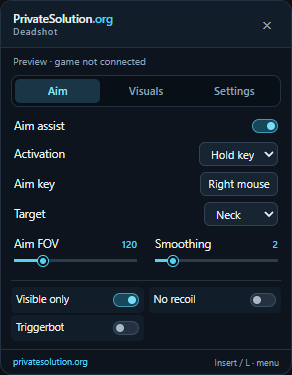
PS-XXXXX-XXXXXand press Play. The key picks the game and is remembered. Join a match, spawn, and press Insert. The setup app already includes the input companion for aim and Triggerbot. Allow Chrome’s mouse-capture prompt if shown. Press Insert for Aim / Visuals / Settings.
Updates & future games
The Windows companion checks for signed extension updates every six hours and at Chrome startup. It waits until your game tabs are closed, updates its installed files and restarts the extension. Saved browser keys stay in place. Use Help & updates → Check for updates to check now, or turn automatic updates off there. Future games need an adapter update. This is a Windows companion update system; no Chrome Web Store item is published.
Already using the previous preview?
Run the new setup and load its copied folder path. Keep the same Chrome profile. The extension identity is unchanged. If Chrome replaces the previous entry, your saved keys should remain; if a key is bound elsewhere, the owner can use Reset device. Keep only one active copy. Rerunning setup updates the files in the same fixed location.
No menu, expired key, or shooting stopped?
Press Insert and choose Open setup, or open privatesolution.org from Chrome’s extensions button. Read the status and retry Play. Keep DevTools closed while Cryzen connects. If shooting stops, turn off Triggerbot and Rapid fire, close the menu and click the game. A changed game client may require an adapter update.
Give someone test access
In Make Keys, choose the game and duration, press Make key, then Copy full setup steps. Send that text. One key per tester; time starts on first activation. Revoke or Reset device in the key list. Keep Owner-Tools and private keys private; client code cannot be guaranteed secret.
Other installation options
Standalone extension ZIP v3.2.4 · Input helper ZIP. These are advanced options. A standalone ZIP needs manual updates unless it is the folder managed by the setup app. Automatic updates apply only to the installed companion folder.
Stable Deadshot.io: Extract the stable app ZIP, run DeadshotIO.exe, activate your PS- key and press Start game. The stable app opens a separate Chrome window. Download Core 2.5.0 / UI 1.0.0. Menu UI v1.0.0.
Menu preview